Eliminate warehouse discrepancy chaos.
OrderManagerPro is an offline-first Windows suite connecting Inbound receiving, Stock Control root-cause investigations, and management analytics in a single SQL-backed workflow.
- Automated financial threshold triage
- Stock Control collision alerts
- Linked multi-line order discovery
- Trilingual: EN / NL / DE
- Zero telemetry & 100% local SQL
OrderManagerPro is open source on GitHub under the MIT licence. Download the automated Inno Setup installer, standalone executable, portable archive, or the complete SQL Server LocalDB database package with 182 realistic sample inquiries and 7 configured role users.
Why warehouse discrepancy tracking breaks down.
When goods arrive at the Inbound docks, discrepancies happen every single day: suppliers deliver too few items, send wrong barcodes, or overdeliver uncounted bundles. Most facilities attempt to track this through disconnected spreadsheets, paper discrepancy slips, or endless email chains.
The result is stock discrepancies going uninvestigated for days, stock control investigators unintentionally duplicating each other's work on the same pallet, and management having zero statistical visibility into supplier defect rates or worker errors.
OrderManagerPro replaces the confusion with a deterministic, role-based desktop platform. Inbound staff register issues in seconds with automated financial routing, Stock Control investigators receive live collision warnings and linked multi-line alerts, and managers track turnaround SLA hours and error patterns in real-time charts.
Six foundational design rules
Built from actual shop-floor requirements to ensure operational speed, data integrity, and accountability.
- Auto-Triage
- Automatically computes financial value (
ProblemAmount × ProductPrice) and quantity ratio (ProblemAmount / OrderAmount × 100). Minor discrepancies under €50 and under 5% bypass stock investigations to prevent backlog bottlenecks. - No Collisions
- Live visual indicators highlight active inquiries in Orange as soon as a colleague opens and investigates them (
InvestigatedBy), preventing two people from hunting for the same pallet simultaneously. - Link Discovery
- Whenever an inquiry is opened, the system queries the database for all other discrepancies sharing the same
OrderNumberand surfaces an interactive Found Inquiry Links workspace for multi-line supplier errors. - Audit Trail
- Every state transition from
ActivetoReadytoFinishedrecords immutable timestamps, creator IDs, investigator comments, root-cause mistake classifications, and found storage bin locations. - SLA & KPIs
- Built-in
System.Windows.Forms.DataVisualizationcharts compute real-time recovery percentages (% Found), employee mistake breakdowns, and resolution duration in hours from creation to closure. - Local & Fast
- Runs 100% locally against Microsoft SQL Server Express LocalDB (
(LocalDB)\MSSQLLocalDB). Zero cloud dependencies, zero latency, zero subscription fees, and complete offline privacy under the MIT licence.
Production Interface in Action
Actual screenshots from OrderManagerPro running with 182 demo order discrepancies and live LocalDB database connectivity.
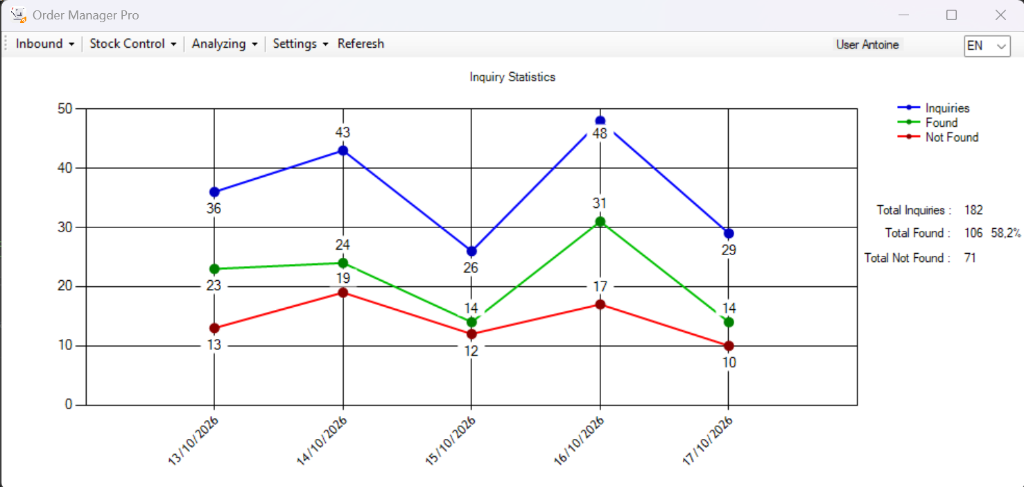
Live multi-series trend line plotting daily Inquiries (blue), Found items (green), and Not Found shortages (red), alongside real-time counters and recovery rate percentage (58.2%).
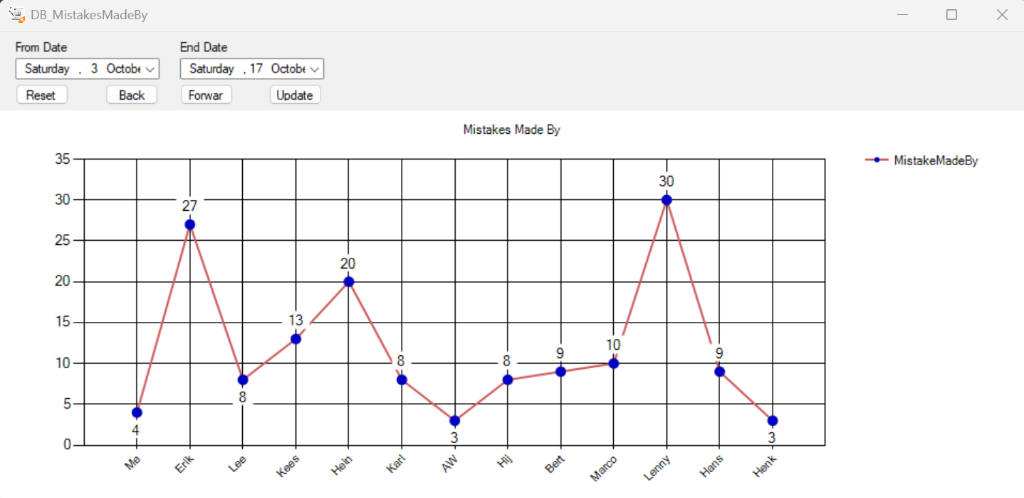
Detailed error attribution chart with custom date-range pickers, highlighting recurrent mistake patterns by employee or receiving station for targeted quality training.
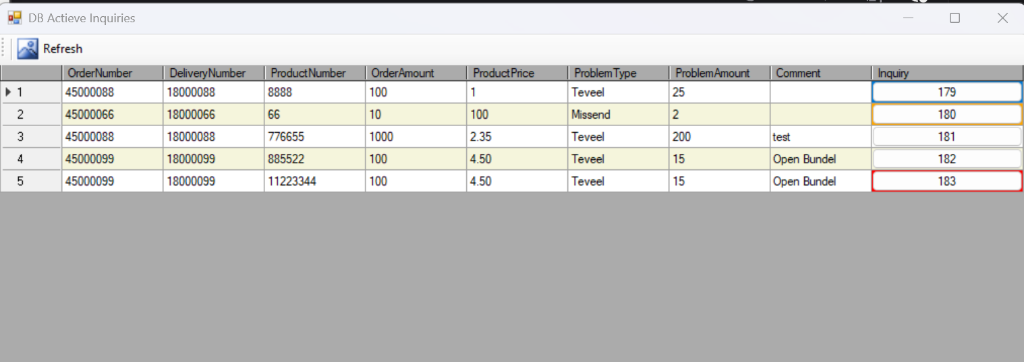
High-density grid showing live discrepancy lines. Inquiry #180 is highlighted in Orange (currently being investigated by another staff member); Inquiry #183 is highlighted in Red (escalated for Senior Approval).
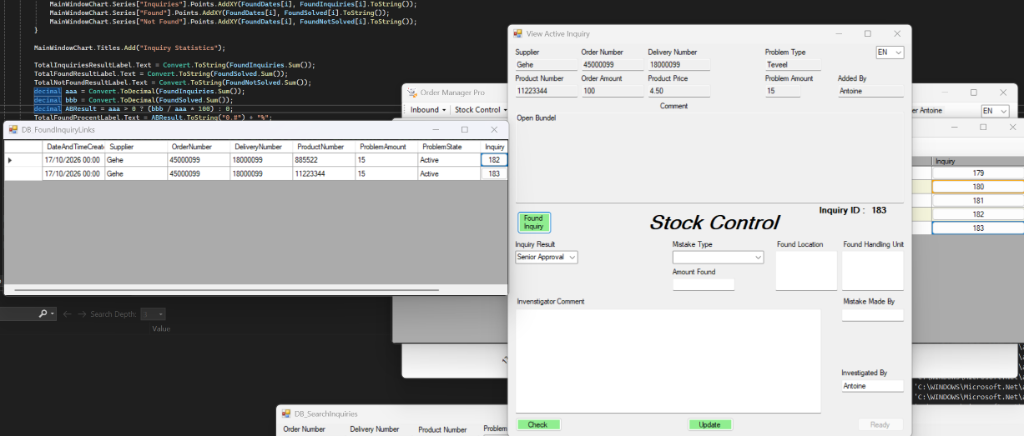
Detailed investigation form showing supplier details, root-cause mistake logging, storage bin location entry, and the green Found Inquiry popup displaying all linked lines sharing Order #45000099.
Complete Architectural Capabilities
Four interconnected modules designed for every warehouse role.
Rapid discrepancy intake with financial threshold routing
Receiving staff on the dock can register shortages (Missend), overdeliveries (Teveel), damaged goods (Beschadigd), or wrong barcode labels in under 20 seconds.
- Live Formula Evaluation: Calculates
ProblemAmount × ProductPriceandProblemAmount / OrderAmount × 100on every keystroke. - Automated Queue Selection: High-value or high-percentage issues automatically set
InquiryOrder = 1andProblemState = Active; minor issues setInquiryOrder = 2andProblemState = Ready. - Two-Step Verification Gate: Clicking Check validates all 11 required data fields, locks inputs to prevent accidental typos, and turns the Add button green. Staff can click Edit at any point to unlock fields.
- Multi-Criteria Search (
DB_SearchInquiries): Real-time filtering across Order Number, Delivery Number, Product Code, Problem Type, and Discrepancy Amount with dynamicDataView.RowFilterqueries.
No bottleneck on minor items. In traditional warehouses, a missing €2 item ties up a skilled stock controller for half an hour. OrderManagerPro's threshold routing eliminates low-value investigation waste completely.
Conflict-free investigation workspace & linked-order detection
Stock Control teams get a clear, prioritised queue of discrepancies that actually warrant physical shelf audits and supplier claims.
- Investigator Claiming: When an investigator opens an inquiry, their name is recorded in
InvestigatedBy. Other colleagues opening the queue immediately see that row highlighted in Orange with a warning tooltip. - Automatic Linked-Inquiry Detection: System scans the database for matching
OrderNumberrecords. If multiple items from the same supplier order had problems, the green Found Inquiry button appears to open the cross-linked summary. - Senior Approval Escalation: Complex disputes or high-value write-offs can be set to
Senior Approval, automatically moving the record to the dedicatedDB_ViewSeniorInquiriesqueue and turning its status border Red. - Full Root-Cause Logging: Captures physical found quantities (
AmountFound), warehouse storage bin (FoundLocation), pallet ID (FoundHandlingUnit), mistake cause (MistakeType), and responsible station (MistakeMadeBy).
Instant Resolution Hand-Off. Clicking Ready transitions the inquiry state to Ready and routes it back to Inbound for final supplier debit/credit processing.
Visual business intelligence & turnaround SLA tracking
Powered by native .NET charting, OrderManagerPro transforms raw warehouse issue logs into actionable operational metrics without requiring external BI subscriptions.
- 14-Day Main Trend Line: Displays daily volume curves for reported inquiries, resolved items (found), and confirmed missing stock (not found).
- Executive Dashboard (
AnalyzingDashBoard): Combines 4 synchronized charts: Total Inquiries Pie Chart, Mistakes by Operator, Mistakes by Category, and Resolution SLA Duration. - SLA Time Tracking (
TimeTracking): Computes exact turnaround duration in hours betweenDateAndTimeCreatedandDateAndTimeReadyfor every calendar day. - Custom Date-Range Filtering: Analyze performance over specific audit periods (last week, month-to-date, or quarterly supplier reviews).
Supplier Accountability. When renegotiating vendor contracts, export concrete discrepancy trends showing exact shortage frequencies and cost impact per supplier.
Role-Based Access Control & Instant Trilingual Localization
Built for international logistics centers with diverse workforce backgrounds and strict operational division of responsibilities.
- SHA-256 Hashed Authentication: Passwords are encrypted with SHA-256 before database verification.
- Four Tailored Role Profiles:
Inbound— Dock creation, search, ready review, and completion archive.Stock Control— Active queue investigation, senior escalation, and archive review.Admin— Full system access, all analytics dashboards, user directory, and database management.Super Admin— System-level console for database path reassignment and bulk clipboard data importing.
- Trilingual UI (English, Nederlands, Deutsch): Switch the interface language on the fly via the top-right dropdown, or store each user's default language in their profile.
Zero External Server Dependence. All role permissions and settings are stored locally in the SQL database file without requiring external Active Directory or cloud identities.
Interactive Discrepancy & Triage Simulator
Test OrderManagerPro's triage calculations directly in your browser. Enter any order line parameters to see how the system routes the issue between Inbound and Stock Control.
SQL Server Database Architecture & Seed Data
OrderManagerPro connects directly to SQL Server LocalDB via C:\DataBase\DatabaseOrderManagerPro.mdf. The repository provides full DDL schema and complete seed scripts.
| Column | Data Type | Description |
|---|---|---|
| ID | INT IDENTITY | Primary key |
| Name | NVARCHAR(100) | Unique login username |
| Group | NVARCHAR(50) | Inbound, Stock Control, Admin, Super Admin |
| Password | NVARCHAR(64) | SHA-256 lowercase hexadecimal hash |
| UserLanguage | NVARCHAR(50) | Default profile language (English, Nederlands, Deutsch) |
| Column | Data Type | Description |
|---|---|---|
| ID | BIGINT IDENTITY | Primary key & Inquiry Tracking ID |
| DateAndTimeCreated | DATETIME2 | Timestamp of inbound intake |
| OrderNumber | NVARCHAR(100) | Purchase order number (used for link detection) |
| ProblemType | NVARCHAR(100) | Shortage, overdelivery, damage, label issue |
| ProblemState | NVARCHAR(50) | Active → Ready → Finished |
| InquiryResult | NVARCHAR(100) | Found, Not Found, Senior Approval |
| InvestigatedBy | NVARCHAR(100) | Claims lock on record to prevent collisions |
| DateAndTimeReady | DATETIME2 | Timestamp when Stock Control completed review |
The release package contains database/schema.sql and database/seed_data.sql, generating all 7 default users (e.g. Antoine, Stock Control, Inbound) and 182 realistic discrepancy records across the last 14 days so all charts light up immediately.
Get OrderManagerPro v1.0.0
Choose the distribution package that matches your deployment preference.
| Package | Size | Format | Target Use Case |
|---|---|---|---|
| OrderManagerPro-Setup-v1.0.0.exe | 2.97 MB | Inno Setup Installer | Full Windows installer with Start Menu & Desktop shortcuts, database auto-provisioning |
| OrderManagerPro.exe | 692 KB | Standalone Executable | Direct executable for workstations with existing LocalDB configuration |
| OrderManagerPro-v1.0.0-Portable.zip | 116 KB | ZIP Archive | Portable package including executable, config, licenses, and SQL schema scripts |
| DatabaseOrderManagerPro-v1.0.0-Database.zip | 1.2 MB | ZIP Archive | Pre-seeded .mdf and .ldf files ready to extract directly to C:\DataBase\ |
Frequently Asked Questions
Common questions regarding installation, database connectivity, and deployment.
What are the system requirements for OrderManagerPro?
Windows 10 or Windows 11 (64-bit), Microsoft .NET Framework 4.8 (pre-installed on modern Windows), and Microsoft SQL Server Express LocalDB (SqlLocalDB.msi).
Where is the database stored by default?
The application looks for its database at C:\DataBase\DatabaseOrderManagerPro.mdf. Super Administrators can reassign this database path at any time using the built-in Settings > DataBase dialog.
How do I install Microsoft SQL Server LocalDB?
LocalDB is a free, official Microsoft component. You can install it in 30 seconds by running SqlLocalDB.msi (included in the repository release) or selecting the SQL Server Express LocalDB component in the Visual Studio Installer.
What are the default login accounts in the demo database?
The database includes 7 ready accounts: Antoine (Admin / English), Stock Control (Stock Control / English), Inbound (Inbound / English), Jan (Admin / Nederlands), Frank (Admin / Nederlands), Rene (Admin / Deutsch), and SuperAdmin (Super Admin). For fresh schema scripts, the default password is 1.
Can OrderManagerPro run in a multi-user network environment?
Yes. By pointing the connection string in App.config (or via SuperAdmin settings) from a local file to a centralized SQL Server instance (e.g. Server=192.168.1.50\SQLEXPRESS;Database=DatabaseOrderManagerPro;...), multiple Inbound and Stock Control stations can operate against the shared database simultaneously.
Does OrderManagerPro send any data to external servers?
No. OrderManagerPro contains zero telemetry, zero analytics trackers, and makes zero outbound internet connections. All database transactions remain strictly on your local computer or private network.
Take control of warehouse discrepancies.
OrderManagerPro v1.0.0 is open source under the MIT licence.
Developed by Biohazard Corp. Learn more at biohazard-corp.nl.