Your Realtek audio card works great. The broken console didn't.
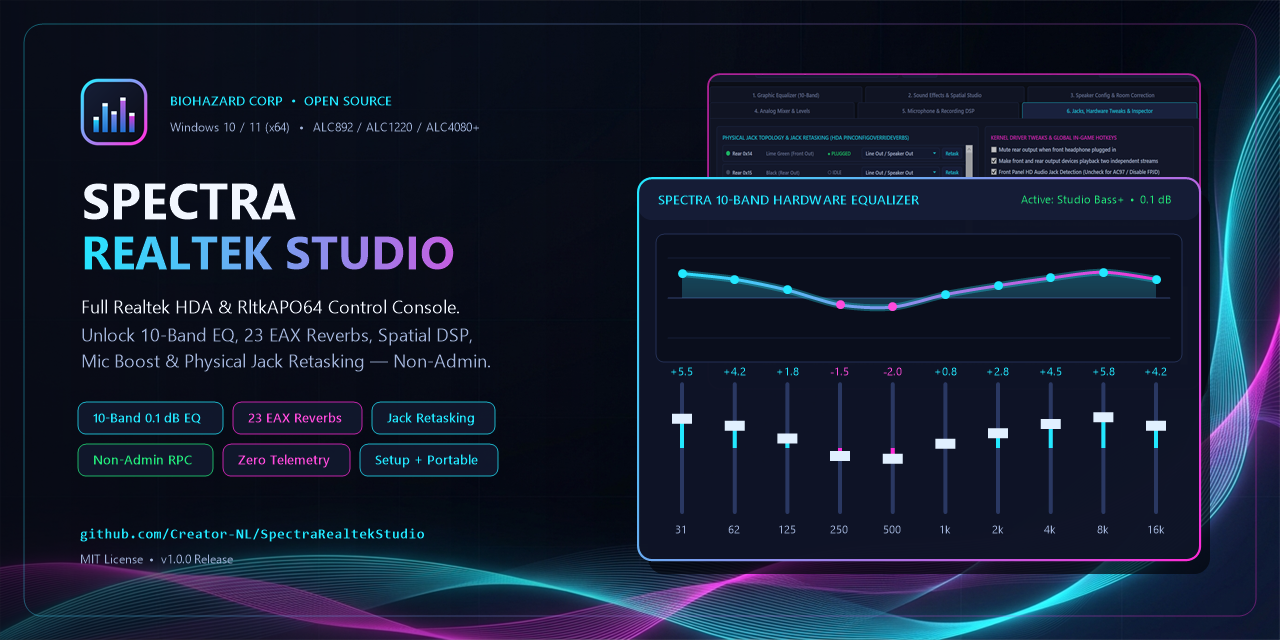
Spectra Realtek Studio is a clean, open-source Windows control console, 60 FPS Audio Visualizer, and CLI that talks directly to your native Realtek APO (RltkAPO64.dll) and Windows Audio RPC (RtkCfg64.dll / IPolicyConfig). Unlock the full 10-Band 0.1 dB Hardware Equalizer, Master Anti-Clip Gain & Auto-Gain Limiter, 256-Band FFT Spectrum (5 Hz – 48 kHz), 23 EAX Reverbs, Karaoke, 3D Spatial DSP, Room Correction, Mic Boost & Voice DSP, and Instant Non-Admin Jack Retasking—with zero bloat or telemetry.
- 10-Band 0.1 dB Hardware EQ
- 60 FPS 256-Band FFT Visualizer (5 Hz–48 kHz)
- Master Gain + Auto-Gain Anti-Clip
- Instant Non-Admin Jack Retasking
- Self-Contained Installer & Portable ZIP
Stereo Mix Endpoint is hidden in Windows Audio (0x10000001). Reveal it via IPolicyConfigClient::SetEndpointVisibility?
Download the self-contained Inno Setup 6 Installer (SpectraRealtekStudio-v1.0.1-Setup.exe, 47.86 MB) or Portable ZIP (SpectraRealtekStudio-v1.0.1-Portable.zip, 66.91 MB) directly from GitHub Releases—no .NET Runtime installation required! Now featuring Tab 7 Live 60 FPS Visualizer (8192-pt FFT, 256 bands, 5 Hz–48 kHz), webpage-style neon EQ, rotary Master Gain & Auto-Gain Anti-Clip Limiter, live 850 ms jack-sense, and built-in update checking with published SHA256SUMS.txt.
Great Realtek silicon shouldn't be ruined by a broken Store app.
Millions of MSI, ASUS, Gigabyte, ASRock, Dell, HP, and Lenovo PCs ship with Realtek High Definition Audio hardware whose kernel driver (RTKVHD64.sys) and System Effects APO (RltkAPO64.dll) deliver crisp 24-bit/192 kHz DACs, a 10-band hardware equalizer, 23 acoustic reverb spaces, multi-channel room correction, and re-taskable 3.5mm jacks.
Yet after Windows updates or driver refreshes, the official Microsoft Store Realtek Audio Console notoriously crashes with "Cannot connect to RPC service"—or loads stripped bare with the Equalizer, Environment Reverb, and Karaoke tabs completely vanished. Classic driver bundles like R282 / R283 dropped the desktop GUI altogether while leaving all DSP engines installed underneath.
"Instead of fighting a broken Store app, talk straight to the native Realtek APO via Windows Audio RPC—turning every hidden feature back on with 0.1 dB precision and zero background bloat."
— Reverse-engineered from RltkAPO64.dll, RtkCfg64.dll & RtCOM64.dll by Biohazard CorpSpectra Realtek Studio replaces that frustration with a lightning-fast native .NET 8 / WPF studio console + automation CLI—built for gamers, audiophiles, creators, and anyone who just wants their sound card controls back.
Six engineering principles behind the console
No custom kernel drivers, no DLL injection, no background cloud updaters—just direct, transparent communication with the audio engine already inside Windows.
- Native APO
- Controls Windows' registered
RltkAPO64.dlldirectly insideaudiodg.exeso every system app, browser, media player, and game receives real-time hardware-grade DSP with zero extra audio latency. - Non-Admin RPC
- Daily EQ, EAX Reverb, Karaoke, Spatial DSP, Speaker Config, Analog Mixer, and Microphone controls communicate through
RtkCfg64.dll(IPolicyConfigClient) over standard Windows Audio RPC—no Administrator elevation required. - 0.1 dB Precision
- Writes the native 40-byte
VT_BLOB(int[10]in hundredths of a dB,-1200..+1200) intoFxPropertiesso you get exact tenth-of-a-decibel control across all 10 frequency bands. - Jack Retasking
- Decodes Intel HDA 32-bit
PinConfigOverrideVerbs(0x71C..0x71F) with live 850 ms kernel jack-sense and instant non-admin retasking viaIRtkPropSet20146::SetDeviceTypeWidget(zero reboot), plus one-click Reset Defaults and anti-pop D3 power tweaks. - Zero Telemetry
- Zero analytics, zero crash uploaders, zero background pings, and zero audio recording. Live WASAPI loopback FFT visualization stays strictly in RAM while Tab 7 is open (
0%CPU idle), and GitHub Releases is checked only when you manually click Check for Updates. - Open Source
- Published under the permissive MIT License with full source code, documented
PROPERTYKEYtables, GitHub Actions CI, and Community Diagnostic JSON export so every codec can be supported.
Inside all seven Spectra Studio modules
Every native capability of your Realtek HDA chip plus a zero-dependency 60 FPS studio visualizer, organized cleanly across seven focused dark-mode tabs—with Master Anti-Clip Gain, System Tray quick-switching, and Global In-Game Hotkeys.
10-Band Graphic Equalizer (31 Hz — 16 kHz · 0.1 dB) & Master Anti-Clip Gain
- Webpage-Style Studio Faders & Live Hex Console: Ten glowing Cyan/Silver vertical faders from
31 Hzto16 kHzin0.1 dBsteps (-12.0to+12.0 dB), double-click reset, and a live 40-byteVT_BLOBhex payload readout. - Cyan → Violet → Magenta Catmull-Rom Curve & Quick Preset Chips: One-click pill buttons for all 13 official Realtek presets (Flat, Rock, Pop, Bass, Powerful, Club, Live, Vocal, Treble, Classical, Party, Soft, Dance) plus unlimited custom JSON presets and full Studio Profile Import/Export.
- Header Master Pre-Mix Gain Knob (
-24..+12 dB) & Auto-Gain Anti-Clip Limiter: Pre-mix 32-bit float digital headroom (works even whenRltkAPO64is bypassed) with selectable70%–95%peak ceiling protection and liveOK / LIM / CLIPmeter badge. - Settings Menu (
⚙), Tooltips & Update Check: Toggleable hover tooltips on every control across all 7 tabs and manual one-click GitHub Releases update checker.
In-Game Hotkeys: Toggle EQ live anytime with Ctrl+Alt+E or cycle presets with Ctrl+Alt+N without alt-tabbing out of your game.
23 EAX Acoustic Reverbs, Karaoke & 3D Spatial Studio
- All 23 Realtek EAX Acoustic Spaces: Generic, Padded Cell, Room, Bathroom, Living Room, Stone Room, Auditorium, Concert Hall, Cave, Arena, Hangar, Carpeted Hallway, Hallway, Stone Corridor, Alley, Forest, City, Mountains, Quarry, Plain, Parking Lot, Sewer Pipe, and Under Water.
- Karaoke & Dynamics Studio: One-click Loudness Equalization (Ctrl+Alt+L), center-channel Voice Cancellation (Ctrl+Alt+K), and real-time Pitch Shift from
-4to+4semitones. - 3D Spatial & Subwoofer Processing: Virtual Surround, Speaker Fill (upmix stereo across 5.1/7.1 speakers), Headphone Virtualization, Speaker Expansion, Bass Management, and Swap Center / Subwoofer output.
- SounzReal & OmniSound Extended DSP: OmniSound 3D, SounzReal OmniHeadphone, VoiceBack dialog clarity, BassBack psychoacoustic low-end, and MP3+ harmonic restoration.
Speaker Configuration, Format & 8-Channel Room Correction
- Speaker Layouts & Studio Formats: Switch seamlessly between Stereo (2.0), Quadraphonic (4.0), 5.1 Surround (Rear/Side), and 7.1 Surround, plus
44.1 / 48 / 96 / 192 kHzand16 / 24-bitPCM + Exclusive Mode toggles. - Interactive 8-Channel Speaker Test Studio: Click individual buttons for
FL,C,FR,SL,Subwoofer (68 Hz LFE pulse),SR,RL,RR, orAll Channels. - Room Correction: Independent distance compensation (
0.00–10.00 mconverted cleanly to Realtek's native millimeter register) and dB gain trim (-12 to +12 dB) across all 8 surround speakers.
Analog Mixer, Live Stereo Balance Sync & 30 FPS Peak Meters
- Real-Time Stereo Peak Meters & Clip Guard: Header-integrated 30 FPS L/R CoreAudio peak meters (
IAudioMeterInformation) with liveOK / LIM / CLIPbadges and adjustable Auto-Gain ceiling markers. - Live Bidirectional Master & Stereo Balance Sync: Fine-tune Front Left and Front Right speaker levels individually—automatically staying in sync in real time with the Header Master slider and Windows Volume Mixer.
- Hardware Direct Input Monitoring (
SingleLineOutTopo): Zero-latency analog passthrough sliders and mute switches inside your Realtek codec (Rear Blue Line-In, Front Pink Mic-In, Rear Pink Mic-In, Aux / Side Monitoring).
Microphone, Line-In, Stereo Mix & Voice Recording DSP
- Clean Capture Device Control & Stereo Mix Unhider: Automatically filters out stale Windows
NOTPRESENTghost duplicates, lets you switch recording endpoints cleanly, and reveals hidden Stereo Mix in one click viaIPolicyConfigClient::SetEndpointVisibility. - Analog Microphone Pre-Amp Boost: Step through
+0 dB,+10 dB,+20 dB, and+30 dBhardware pre-amp gain alongside recording volume & mute. - Full Realtek Voice DSP Suite: Noise Suppression, Acoustic Echo Cancellation (AEC), Directional Beam Forming, DC Offset Cancellation, Mono Microphone Mode, Conference Call Mode, and Keystroke Noise Suppression.
Live Jack-Sense, Instant Non-Admin Retasking, Kernel Tweaks & Inspector
- Live 850 ms Kernel Jack-Sense & Instant Non-Admin Retasking: Polls physical 3.5mm jacks (
0x14..0x1B) live via KS property with per-pin hardware capability bitmasks, retasks jack roles instantly without UAC or reboot viaIRtkPropSet20146::SetDeviceTypeWidget, and includes one-click Reset Defaults. - Kernel Driver Tweaks: Toggle rear mute on front headphone insert (
HpShutsOffRearSpeaker), independent front/rear multi-streaming (EnableDynamicDevices), Front Panel HD Audio vs. AC97 detection, and Anti-Pop D3 Power Management. - Live
FxPropertiesInspector & Raw HDA Verb Console: Searchable live decoded table of every APO property on your card, directSendVerbconsole, and one-click Community Diagnostic JSON export.
Live 60 FPS Audio Visualizer (5 Hz — 48 kHz · 8192-Point FFT)
- Zero-Dependency WASAPI Loopback + 256-Band Hi-Res FFT: Captures live Stereo, Quad (4.0), 5.1, and 7.1 playback streams (
44.1–192 kHz) with tight~42 mssync whetherRltkAPO64is enabled or bypassed. Switch smoothly between 64, 128, or 256 bands and 5 Hz–48 kHz (Full), 5 Hz–24 kHz (Studio), 0–48 kHz (Linear), or 20 Hz–20 kHz (EQ) ranges with uniform grid spacing. - 6 Real-Time Studio Visualization Modes: Spectrum Bars (FFT + Peak Hold), Mirror Spectrum Wave, Stereo Oscilloscope (L/R), Spectrogram Waterfall (Heat), Stereo Vectorscope (Phase XY), and Radial Cyber Halo (360°) across 4 neon palettes (Spectra Neon, Studio RTA, Electric Ice, Plasma Fire).
- Live Mastering Telemetry & True
0%Idle Overhead: Real-time Dominant Peak Hz, RMS Loudness (dBFS), Stereo Phase Correlation, and WASAPI format readout—automatically shutting down capture (0%CPU) whenever you switch tabs, click Pause, minimize, or send to tray.
How Spectra talks to your Realtek chip without breaking Windows
Click any block in the live audio control pipeline below to see how non-admin RPC, COM interop, and hardware APOs fit together.
1. Spectra Realtek Studio (WPF Desktop Console + 60 FPS Visualizer + Tray + CLI)
Lightweight native .NET 8 application running as a standard unprivileged user. Renders the 7-tab Spectra interface, 60 FPS 256-band WASAPI loopback FFT Visualizer (0% CPU idle), 30 FPS peak meters + Master Pre-Mix Anti-Clip Gain, System Tray quick-switcher (--minimized startup), and Global Hotkeys (Ctrl+Alt+E/N/L/K), while SpectraRealtekStudio.Cli.exe exposes scriptable automation.
- Non-Admin AudioSrv RPC
- Direct writes to
HKLM\...\FxPropertiesfail without Admin and never wake upaudiodg.exe. CallingIPolicyConfigClient::SetPropertyValueover RPC works cleanly as a standard user and applies changes immediately. - RtCOM64 Cold-Init Sequence
- Calling per-device
Vista*methods onRtCOM64.dllcrashes cold unless you first callIPropSet::Init()followed byIPropSet20065::GetDeviceCount()—handled automatically inRealtekComInterop. - 32-Bit HDA Pin Verbs
- Intel High Definition Audio encodes each 3.5mm jack's location, color, connector, and default role into four 8-bit configuration verbs (
0x71C..0x71F) stored inPinConfigOverrideVerbs. - Anti-Pop D3 Power Fix
- Eliminates the annoying speaker crackle or pop when audio starts/stops by preventing the Realtek codec from sleeping into deep
D3idle power state insidePowerSettings.
Interactive 10-Band Realtek EQ & Web Audio Lab
Try all 13 official Realtek presets or drag any frequency fader below. Watch the live Catmull-Rom response curve and exact 40-byte VT_BLOB APO payload update in real time—and click Play Studio Test Chord to hear the 10-band filter right in your browser!
Interactive Intel HDA Jack Retasking & Verb Decoder
See how Spectra Realtek Studio decodes your motherboard's physical 3.5mm jacks and computes exact Intel HDA 0x71E Default Device override verbs.
HKLM\...\PinConfigOverrideVerbs.
[23:20] of the 32-bit Pin Configuration Default register.
Open Reverse-Engineered RltkAPO64.dll Reference & CLI
Documented openly for the Windows audio developer community. Every primary Realtek APO control lives inside FxProperties under GUID {4b361010-def7-43a1-a5dc-071d955b62f7}.
| PROPERTYKEY | Variant Type | Controlled Realtek Feature |
|---|---|---|
| {4b361010-...},1 & ,2 | VT_UI4 | EAX Environment Reverb Enable (0/1) & Preset Index (0..22 — Generic through Under Water). |
| {4b361010-...},3 & ,4 | VT_UI4 / VT_I4 | Karaoke Voice Cancellation (0/1) & Pitch Shift Semitones (-4..+4). |
| {4b361010-...},5 & ,6 | VT_UI4 / VT_BLOB | 10-Band Graphic Equalizer Enable & 40-byte Band Gains (int[10], hundredths of a dB: -1200..+1200). |
| {4b361010-...},7 | VT_UI4 | Loudness Equalization (dynamic volume normalization). |
| {4b361010-...},8 .. ,13 | VT_UI4 | Speaker Fill (,8), Virtual Surround (,9), Headphone Virt (,10), Bass Mgt (,11), Speaker Expansion (,12), Swap C/Sub (,13). |
| {4b361010-...},14 | VT_UI4 | Room Correction Enable (paired with RtCOM64.dll IPropSet20083 per-speaker mm distance & dB trim). |
Scriptable Command-Line Interface (SpectraRealtekStudio.Cli.exe)
Bundled inside both the Installer and Portable ZIP for instant hardware checks, hotkey scripts, and community diagnostic dumps:
SpectraRealtekStudio.Cli.exe status && SpectraRealtekStudio.Cli.exe preset Rock
Supports status, preset <Name>, eq <on|off>, loudness <on|off>, diag [report.json], and test.
Frequently asked questions
Which Realtek audio chips and Windows versions are supported?
Spectra Realtek Studio runs on Windows 10 and Windows 11 (x64) and works with any Realtek High Definition Audio codec using the standard Realtek HDA/UAD APO stack—including ALC887, ALC888, ALC892, ALC897, ALC898, ALC1150, ALC1200, ALC1220, and ALC4080. If your board uses a custom OEM key, export a JSON report from Tab 6 and share it on GitHub Discussions!
Do I need to install .NET 8 Runtime separately?
No! Both official release downloads—SpectraRealtekStudio-v1.0.1-Setup.exe (47.86 MB) and SpectraRealtekStudio-v1.0.1-Portable.zip (66.91 MB)—are published as 100% self-contained win-x64 builds. Just install or unzip and launch.
Why does Windows SmartScreen warn on first launch?
Because Spectra Realtek Studio is a free, community MIT open-source tool without a commercial EV code-signing certificate, SmartScreen may show "Windows protected your PC" until community reputation builds. You can verify the official SHA256SUMS.txt on GitHub Releases, or compile the exact installer yourself from source in one command using .\build-package.ps1.
Is it safe to run while playing competitive online games with anti-cheat?
100% safe. Spectra Realtek Studio never hooks game processes, never injects DLLs, and never alters kernel drivers. It uses standard Windows Audio RPC, read-only WASAPI loopback when Tab 7 is open, and standard Win32 global hotkeys (RegisterHotKey).
Does it need Administrator privileges?
No for all everyday audio controls—including Equalizer, Master Anti-Clip Gain, 60 FPS Visualizer, EAX Reverb, Karaoke, Spatial DSP, Speaker Config, Analog Mixer, Microphone DSP, and instant live Jack Retasking (via IRtkPropSet20146). Only optional kernel registry buttons in Tab 6 (Apply Driver Tweaks or PnP fallback) prompt for UAC because Windows restricts writes under HKLM\SYSTEM\CurrentControlSet\Control\Class.
Take back control of your Realtek audio hardware.
Free, open-source, self-contained, and zero telemetry. Grab the Windows Installer or Portable ZIP on GitHub Releases and join the community.
Engineered by Biohazard Corp / Creator-NL · MIT License · More at biohazard-corp.nl.